Hybrid Event Video Production in Miami: How to Choose the Right Livestreaming Platform
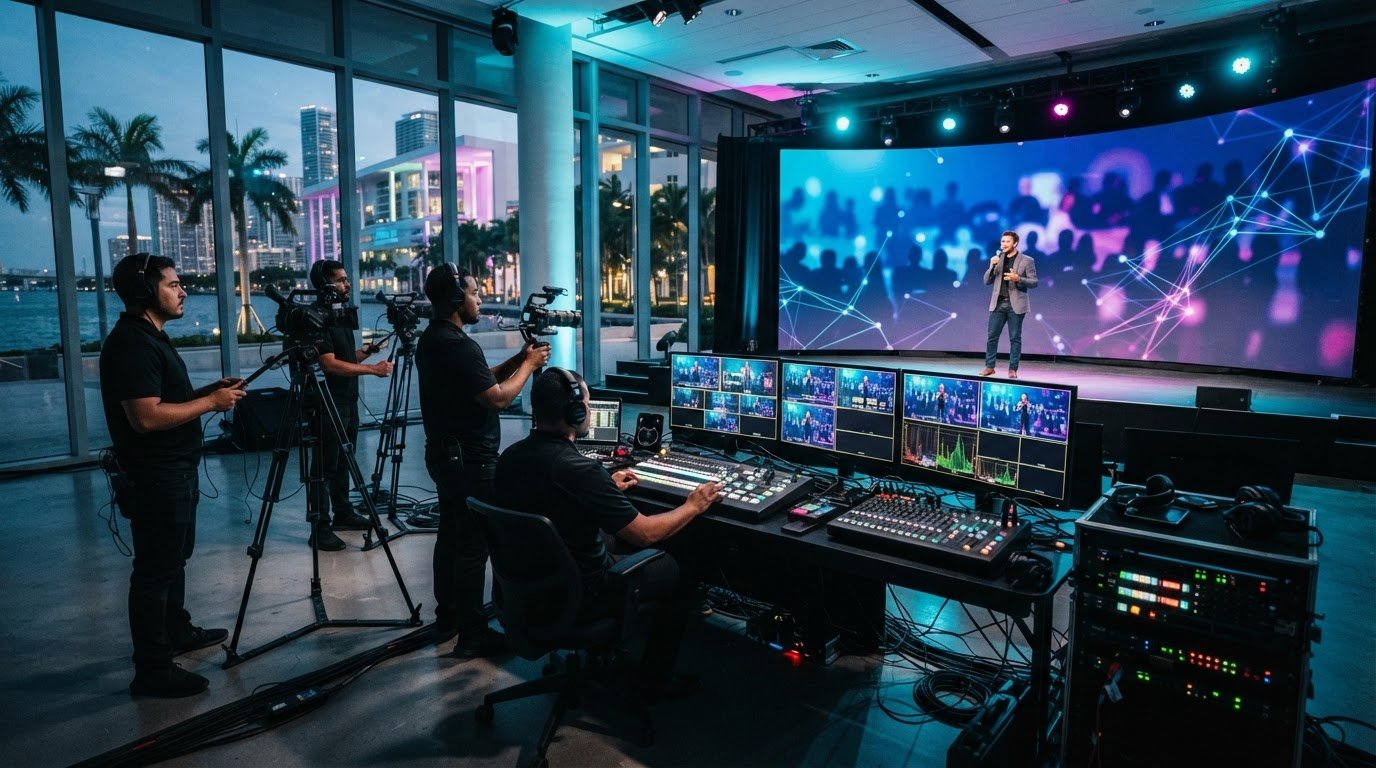
The livestreaming platform with the longest feature list may not be right for your event. When planning hybrid event video production miami, consider how the platform and live production will work together so remote attendees can follow the program and take part in the ways that matter.
Choosing a platform can feel like the biggest decision, especially when options differ in audience tools, streaming features, and distribution. But the platform is only one part of the plan. A cohesive hybrid event also depends on how cameras, audio, switching, and the live stream are managed at the venue.
This guide offers a practical way to compare business livestreaming platforms against your event format, audience needs, and engagement goals. You’ll learn to assess platform features separately from production requirements, then connect them in a workable plan. We’ll also cover the role of a Miami production partner, including technical direction, multi-camera switching, and real-time encoding, so you can review the full workflow before choosing a platform.
Key Takeaways
- Match platform capabilities to your audience, access needs, event format, and desired interaction.
- Compare video-conferencing tools, dedicated event platforms, and public livestreaming services against your event workflow.
- Separate platform features from production requirements: technical direction, camera switching, and encoding shape what remote viewers see and hear.
- Assess venue conditions and production needs before choosing a platform for hybrid event video production miami.
- A production partner can help align platform selection and live execution for a consistent experience for onsite and remote audiences.
What hybrid event video production in Miami needs from a livestreaming platform
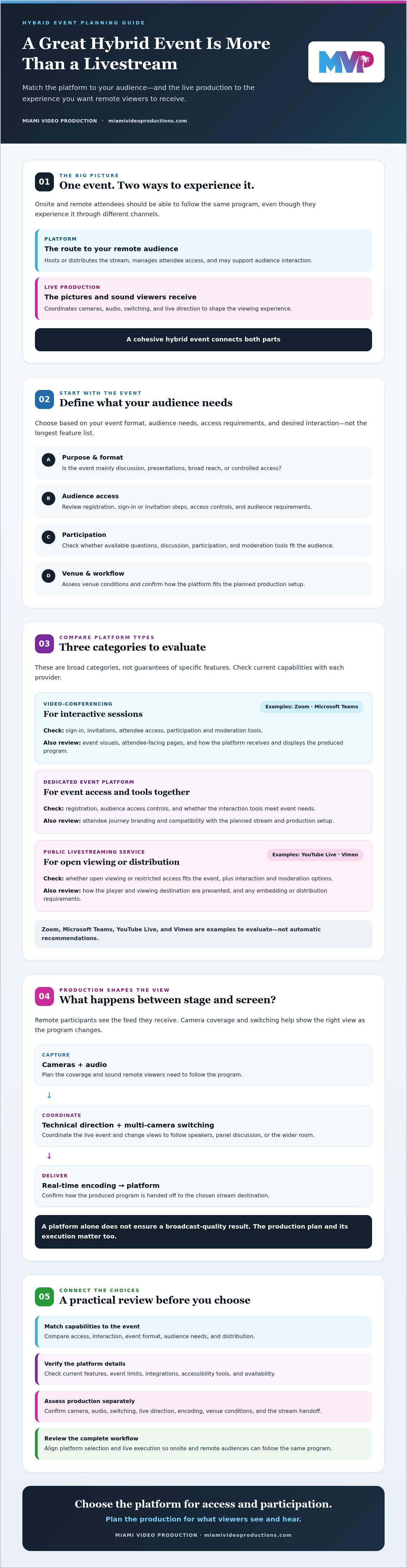
A hybrid event serves people in the room and people joining remotely. Both groups should be able to follow the same program, even though they experience it through different channels. For teams researching hybrid event video production miami, the key distinction is that a platform provides the stream destination and audience tools, while production shapes the pictures and sound viewers receive.
Platform selection: Choose where the stream will be hosted or distributed, how remote participants will access it, and what interaction tools they need.
Professional event video production: Plan and coordinate the cameras, audio, switching, and live direction that shape the viewing experience.
What does a hybrid event platform actually do?
A platform may host a livestream, manage attendee access, and support interaction such as questions or audience discussion. Features vary by provider and plan, so check current capabilities, event limits, integrations, accessibility tools, and availability before deciding.
These features are different from production services. A registration tool does not direct the show, and a chat function does not select the right camera view. Evaluate access and interaction based on your audience, then assess production requirements separately.
Why does production matter beyond the platform?
Remote participants see the video feed they receive. Camera coverage and switching determine whether they see a speaker, a panel discussion, or the wider room at the right moment. A single static angle may miss important context or make it harder to follow a change in speakers.
Technical direction coordinates the live event with the stream, including when camera views or other program elements change. Miami Video Production’s event livestreaming includes technical direction, multi-camera switching, and real-time encoding. A platform alone does not ensure a broadcast-quality result. The production plan and its execution matter too.
Think of the platform as the route to your remote audience, not the entire viewing experience. Assess whether attendees can access and participate in the event, then confirm how production will deliver coordinated video and audio to that platform. For an event in Miami, the right setup depends on the format, venue, and audience, not simply the platform’s feature list.
Compare business livestreaming platform options for hybrid events
No single platform suits every event. A leadership town hall may need controlled access and live questions, while a public product announcement may prioritize broad reach. Compare platform categories against how your audience will attend and participate, then confirm current features directly with each provider. Zoom, Microsoft Teams, YouTube Live, and Vimeo are examples to evaluate, not automatic recommendations.
Which platform category fits your event format?
Start with the event’s main purpose: discussion, presentations, broad reach, or controlled access. Video-conferencing platforms may suit interactive sessions; dedicated event platforms may bring attendee access and event tools together; public livestreaming services may suit open viewing. These are broad categories, not guarantees of specific features. For each option, check registration steps, access controls, audience requirements, and interaction tools.
| Platform category | Audience access | Interaction | Branding | Production workflow |
|---|---|---|---|---|
| Video-conferencing, such as Zoom or Microsoft Teams | Check sign-in, invitation, and attendee access requirements. | Confirm available participation and moderation tools. | Review options for event visuals and attendee-facing pages. | Test how the platform receives and displays the produced program. |
| Dedicated event platform | Assess registration and any audience access controls. | Compare the interaction tools with the event’s needs. | Check how much of the attendee journey can reflect your brand. | Confirm compatibility with the planned stream and production setup. |
| Public livestreaming service, such as YouTube Live or Vimeo | Determine whether open viewing or restricted access fits your use case. | Review available audience interaction and moderation options. | Check how the player and viewing destination can be presented. | Test the stream handoff and any embedding or distribution requirements. |
How should buyers compare platform capabilities?
Build a feature matrix around your requirements, not marketing claims. For each platform, record whether streaming, moderation, analytics, accessibility tools, and integrations meet the event’s needs. Mark each item available, unavailable, or unverified, then confirm product-specific details before committing. Features, limits, and availability can change.
Next, review the workflow with the people responsible for event technology and production. Confirm how the platform fits existing systems and how the live program will reach it. This matters for hybrid event video production miami, where platform selection and live execution should be planned together. A discussion about hybrid event livestreaming production can help clarify those requirements before you commit.
Will the platform alone deliver a polished hybrid event?
A platform subscription can provide a way to deliver video and manage remote access, but it does not cover every production decision. For hybrid event video production miami planners should treat the platform and live show as connected parts of the plan with separate responsibilities. The platform provides access or distribution; production coordinates the pictures and sound remote viewers receive.
| Platform-only benefit | Production consideration |
|---|---|
| Provides a destination for remote attendees to watch the event. | Decide how camera coverage will show speakers, panels, and relevant activity. |
| May offer access and audience interaction tools, depending on the platform and plan. | Plan how questions, speaker transitions, and the onsite program fit into the live show. |
| Can simplify some aspects of online distribution. | Confirm how the production workflow connects to the selected platform, including real-time encoding. |
Where can platform-only event plans fall short?
A feature list cannot answer every show-planning question. Who is responsible for capturing clear audio? Which camera view should remote attendees see during a panel, and how will the stream handle a speaker handoff? These decisions shape the remote perspective. A reliable plan coordinates the platform, event flow, and production instead of assuming a platform feature guarantees the outcome.
When does professional event video production add value?
Professional production can help when a fixed view will not capture the event clearly, such as during a multi-speaker session or a program with movement across the stage. Multi-camera switching can follow the active speaker or move to a wider view when the room matters. Technical direction coordinates those choices with the show flow, while real-time encoding prepares the live program for delivery through the selected platform.
Discuss contingency planning with the production team while defining the event scope. Clarify responsibilities, how transitions will be coordinated, and what options to consider if a planned element changes. Miami Video Production provides event livestreaming with technical direction, multi-camera switching, and real-time encoding. The goal is a coordinated workflow in which platform access and live production support the same audience experience.
How to choose a platform for your Miami hybrid event
Choose a platform after defining what the event needs to do. A conference with remote panelists has different requirements from an in-room presentation streamed to a large remote audience. For hybrid event video production miami, also confirm the venue’s conditions instead of assuming every location has the same access, connectivity, or technical setup.
What should you confirm before selecting a platform?
- Define the audience. Estimate remote attendance and identify who should be able to join. Decide whether access will be open, invitation-based, or managed through registration.
- Set the event format. List the program elements that need to appear online, such as presentations, panel discussions, or remote speakers. Note where the online experience may differ from the in-room program.
- Specify access and interaction. Identify registration, audience participation, accessibility, and reporting requirements. Check that each candidate platform supports them, and confirm current plan details with the provider.
- Map production requirements. Outline camera coverage, speaker transitions, audio, and how the live program will reach the platform. Ask the production team and platform provider to review compatibility before you commit.
- Verify venue conditions. Confirm venue access, connectivity, permissions, and technical requirements with the venue and other relevant parties. Conditions vary by location, so review the actual room and planned setup.
How should platform and production plans be tested?
Schedule a technical review using the intended event format and production setup. Rehearse speaker handoffs, remote participation, and the attendee viewing experience. A rehearsal can help identify workflow questions in advance, though it cannot guarantee how every live condition will unfold.
Document who administers the platform, manages attendee access, coordinates the show, and makes production decisions. Clear ownership helps prevent gaps between the event team and the people responsible for the stream. For more planning guidance, see the broadcast-quality livestreaming guide.
Before settling on a platform, discuss your event requirements with a Miami production partner. Aligning the platform, venue conditions, and production workflow early gives your team a clearer basis for the final choice.
Plan hybrid event video production in Miami with a production partner
A production partner can connect the platform decision to the event plan. The right approach depends on what attendees need to see and do, how the program will run, and how the live production will reach remote viewers. For hybrid event video production miami, involve the production team early enough to review these needs before platform and workflow decisions are fixed.
What should you share with a Miami event video production team?
Bring the details that will shape the show and its stream. A useful planning brief includes:
- Event basics: Date, venue, program format, speakers, and expected remote audience.
- Audience needs: How people should access the event and which interactions, such as questions or discussion, matter to the experience.
- Platform preferences: Any platform under consideration, required features, and existing technology or system constraints.
- Venue considerations: Known access arrangements and technical requirements, plus questions that still need confirmation from the venue.
- Responsibilities: Who will manage platform administration, attendee access, venue coordination, and live production decisions.
Clarifying ownership helps reveal gaps early. Identify who manages the online attendee experience and who coordinates camera views and show transitions. A production partner can review how those responsibilities fit together, rather than treating platform choice and production planning as separate decisions.
What happens in an initial production conversation?
The conversation should start with your event objectives, not a predetermined platform or production setup. From there, the team can discuss audience expectations, event format, platform considerations, and technical requirements that need further review. Miami Video Production is an independent boutique agency serving Miami and South Florida, with event livestreaming that includes technical direction, multi-camera switching, and real-time encoding.
Share your event goals, location, program, and audience needs to give the discussion a practical starting point. Ask which production responsibilities the team can support and what details need confirmation with the venue or platform provider. For broader guidance on evaluating a local provider, read the Miami video production company selection guide.
To discuss your event requirements with Miami Video Production’s event livestreaming team, share the format you’re planning and the experience you want onsite and remote attendees to have. That gives both sides a clear basis for discussing the platform and production approach.
Bring Your Hybrid Event Plan Together
The right livestreaming platform should fit your audience, event format, access needs, and interaction goals. But platform features are only one part of the plan. Production decisions shape the viewing experience for remote and onsite attendees. For hybrid event video production miami planners, aligning the platform and production workflow early can make the next steps clearer.
Miami Video Production provides broadcast-quality event livestreaming in South Florida, including technical direction, multi-camera switching, and real-time encoding. Share your event goals, location, and audience needs to start a practical conversation about the production approach and platform considerations.
Discuss your Miami hybrid event production needs and take the next step toward a coordinated event plan.
Frequently Asked Questions
What is hybrid event video production?
Hybrid event video production combines a live event for onsite attendees with a planned viewing experience for remote participants. It includes producing the video and audio sent to the online audience, while a livestreaming platform provides a way to access or distribute the stream. For hybrid event video production miami planners, the production plan may include technical direction, camera switching, and encoding tailored to the event format and audience.
Which livestreaming platform is best for a business hybrid event?
The best platform is the one that meets your event’s access, interaction, branding, and reporting requirements. First decide whether attendees need open viewing, controlled access, registration, or active discussion. Then compare suitable platforms against those needs. Check current features, limits, integrations, and accessibility options with each provider, and confirm that the platform fits the production workflow. No single option is right for every business event.
Can I use Zoom or Microsoft Teams for a hybrid event?
Zoom or Microsoft Teams may suit a hybrid event, depending on its format and requirements. Before choosing, confirm current business features, access controls, participant requirements, interaction tools, and compatibility with the production setup. A meeting-oriented format may suit discussion, while a presentation-led event may call for a different viewing workflow. Rehearse the stream and attendee experience before the event.
Do I need a video production company for a hybrid event?
Not every hybrid event requires a production company, but professional support can help when the program needs coordinated camera coverage, speaker transitions, or a produced livestream. A platform provides access or distribution tools; it does not automatically direct the show or determine what remote viewers see and hear. Consider the event’s complexity, audience expectations, and in-house expertise. A production partner can help assess those needs and plan the live execution.
How do you choose a hybrid event video production company in Miami?
Look for a partner whose services match your event requirements, and ask how production responsibilities will be coordinated with the venue and platform. Discuss the program, speakers, remote audience, technical requirements, and rehearsal approach before settling on a plan. Miami Video Production serves Miami, Broward, West Palm Beach, Fort Lauderdale, North Miami, Fort Myers, and Naples. Its event livestreaming includes technical direction, multi-camera switching, and real-time encoding.
What should we test before livestreaming a hybrid event?
Rehearse using the intended event format and production workflow. Check that remote attendees can access the event, confirm speaker transitions and audience participation, and review how the stream presents the program. Test audio and camera views from a remote viewer’s perspective, and verify who is responsible for platform administration and live production. Confirm venue conditions and technical requirements with the relevant parties, since setups vary by location. Document open questions before event day.
